Kodi
Screenshots
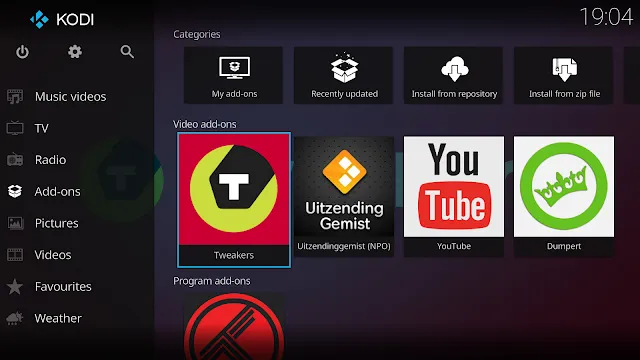
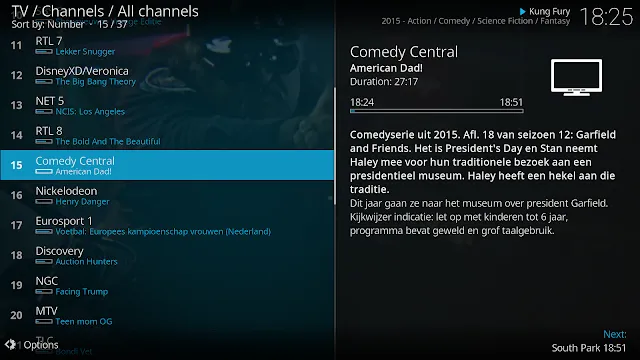
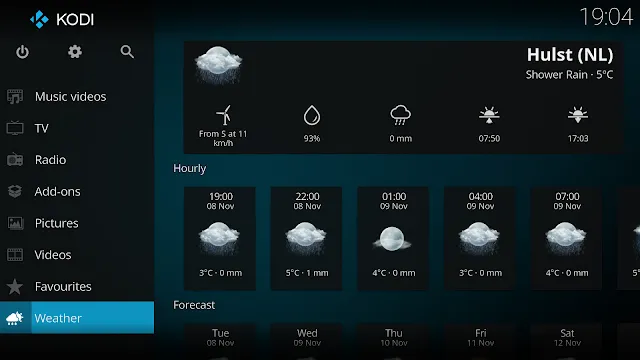
Kodi is a free and open-source media player application that transforms your mobile device or tablet into a complete home theater system. This software allows you to organize and view your videos, photos, and music in a clean and beautiful interface. It does not provide any content itself. Instead, it relies on you to provide your own media from local storage or remote locations. The application supports a vast range of file formats, making it a flexible choice for media enthusiasts. It uses a “10-foot user interface” designed to be readable from a distance. This makes it perfect for large screens and touch-based devices alike.
Getting Started with Kodi
Setting up the application is the first step toward a personalized media experience. Once you install the software, you enter a blank slate. You must point the app to your folders containing movies or songs. The system then scans these files and pulls in metadata like posters and cast lists. This process creates a professional library that looks like a premium streaming service.
- Open the application and navigate to the media section.
- Select “Add Videos” to browse your device storage.
- Choose a folder and name your media source.
- Allow the scraper to find artwork and information online.
The interface reacts quickly to touch inputs. You can swipe through your collection with ease. It also supports various skins that change the entire look of the player. If you prefer a minimalist design, you can switch to a simpler layout in the settings menu.
Optimizing Kodi for Local Media
This player handles high-definition files without significant lag. It utilizes the hardware acceleration of your device to ensure smooth playback of 4K content. You can store your files on an SD card or internal memory. The app organizes these files into categories like Movies, TV Shows, and Music Videos.
- Go to the “Settings” menu and select “Media.”
- Enable “Library” mode to see your media with posters.
- Adjust the video settings to match your screen resolution.
- Configure the audio output for the best sound quality.
The music player is equally impressive. It displays album covers and lyrics while you listen. You can create custom playlists for different moods directly within the app. Because it supports lossless formats, audiophiles often choose this tool for their high-quality music collections.
Enhancing the User Experience in Kodi
Customization is a core strength of this platform. You can install various add-ons to extend the functionality of the player. These add-ons allow you to access different types of public domain content or weather information. You can also change the background images and color schemes to reflect your personality.
- Skins: Change the visual theme to match your style.
- Add-ons: Add new features like subtitle downloaders or weather modules.
- Profiles: Create different profiles for family members to keep libraries separate.
- Web Interface: Control your player from a laptop or another phone on the same network.
Managing your settings is simple. The menu structure is logical and easy to follow. You can even lock certain sections with a password. This is helpful if you want to prevent children from changing your library configuration.
Managing Your Library with Kodi
The software acts as a powerful database for your entertainment. It tracks which movies you have watched and where you left off in a TV series. If you stop a video halfway, the app remembers the exact second. When you return, it asks if you want to resume or start over.
The search function is very fast. You can find a specific actor or genre across your entire collection. It also allows you to filter content by year or rating. This makes it easy to decide what to watch on a movie night. The app also supports “Party Mode” for music. This mode shuffles your songs and creates a continuous stream of audio for guests.
Technical Performance and Compatibility
Stability is a priority for the developers of this software. The application receives regular updates to fix bugs and improve performance. It is designed to run on a wide variety of hardware, from budget phones to high-end tablets. It uses system resources efficiently to prevent overheating or battery drain.
- File Support: Plays MKV, MP4, AVI, and many other formats.
- Network Playback: Accesses files from a NAS or a home server.
- Subtitles: Supports multiple subtitle formats and languages.
- UPnP/DLNA: Streams media to other devices in your house.
Network compatibility allows you to keep your heavy files on a computer and watch them on your mobile. This saves valuable space on your device. The connection remains stable as long as your Wi-Fi signal is strong. It eliminates the need to constantly transfer files via USB cables.
Advanced Features and Remote Control
You can turn your device into a remote control for other versions of the software running on a TV. This cross-device communication is a favorite feature among long-term users. The app supports physical remote controls and game controllers via Bluetooth as well. This allows you to navigate the interface without touching the screen.
The software also includes a powerful image viewer. You can display your holiday photos in a slideshow with various transition effects. It can even play background music during the show. This makes it a great tool for sharing memories with friends and family. The app handles large image files quickly, ensuring a smooth viewing experience.
Conclusion
Kodi provides a comprehensive solution for managing your digital entertainment. It gives you total control over how you view your own media files. The ability to customize the interface and add new features makes it a favorite for many. It is a reliable tool that turns any compatible device into a high-end media center. By organizing your local files and optimizing the settings, you can enjoy a cinematic experience anywhere. The software remains a top choice because it is free, open, and constantly improving. It empowers you to take your media library with you wherever you go.